Building a secure static website with Next.js and GitHub Pages
This post explains how I built and deployed this website using modern web technologies, automated workflows, and security best practices.
Cost Breakdown
The entire setup is remarkably cost-effective. The only expense is the domain registration (approximately £10-15 per year). Everything else is free:
- GitHub Pages hosting - Free
- SSL/TLS certificate - Free (provided by GitHub)
- GitHub Actions CI/CD - Free for public repositories
- Private repository - Free with GitHub account
This makes it an excellent solution for personal websites and portfolios without ongoing hosting costs.
Architecture Overview
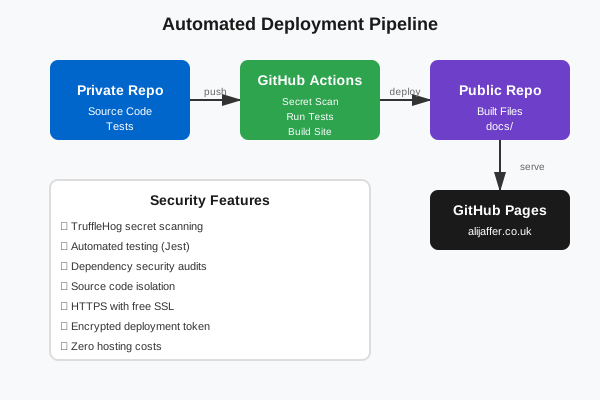
The site uses a dual-repository approach: a private development repository for source code and a public repository for hosting. This separation ensures source code remains private while the built site is publicly accessible.
Technology Stack
- Next.js 16 with static export for optimal performance
- TypeScript for type safety
- Tailwind CSS for styling
- Jest and React Testing Library for automated testing
- GitHub Actions for CI/CD
- GitHub Pages for hosting
Deployment Pipeline
Every push to the main branch triggers an automated workflow that runs tests, scans for secrets using TruffleHog, builds the static site, and deploys to the public repository. This ensures only tested, secure code reaches production.
Security Measures
- Secret scanning prevents credential leaks
- Automated security audits on dependencies
- External links use rel="noopener noreferrer"
- Custom domain with HTTPS enabled
- Source code isolated in private repository
Custom Domain Setup
The site uses a custom domain configured through DNS A records pointing to GitHub Pages servers, with a CNAME file ensuring the domain persists across deployments.
Key Takeaways
Static site generation offers excellent performance and security. Automated testing and deployment pipelines ensure reliability. Separating source code from deployment artifacts maintains security while enabling public hosting.
The entire setup demonstrates how modern DevOps practices can be applied to personal projects, creating a professional, secure, cost-effective and maintainable web presence.